Capture. Validate. Route
AI AGENT FOR NETSUITE · AP AGENT
Stop keying vendor bills into NetSuite line by line. The AP Agent reads every invoice, checks it against your POs and past bills, and routes it to the right approver. Your team only steps in when something needs a decision.
‍‍
  • Upload a PDF or photo and get a bill in NetSuite
  • Duplicates and mismatches held before they post
  • Plain-English answers on what’s waiting and why
    ‍
Talk to an expert
Book a personalized 30-minute session with one of our experts!
Button arrow arrow right white
NetSuite
Solution
Finder
RAPSODOHAKLUYTHAKLUYTHAKLUYTHAKLUYTHAKLUYT

Why Choose the AP Agent

  • Native to NetSuite, with no separate  Two-way and three-way
  • AP system Any invoice layout, with no templates or training
  • Vendors submit by email, upload or portal, with no NetSuite login
  • PO matching Live in days, not months

How AP Agent works

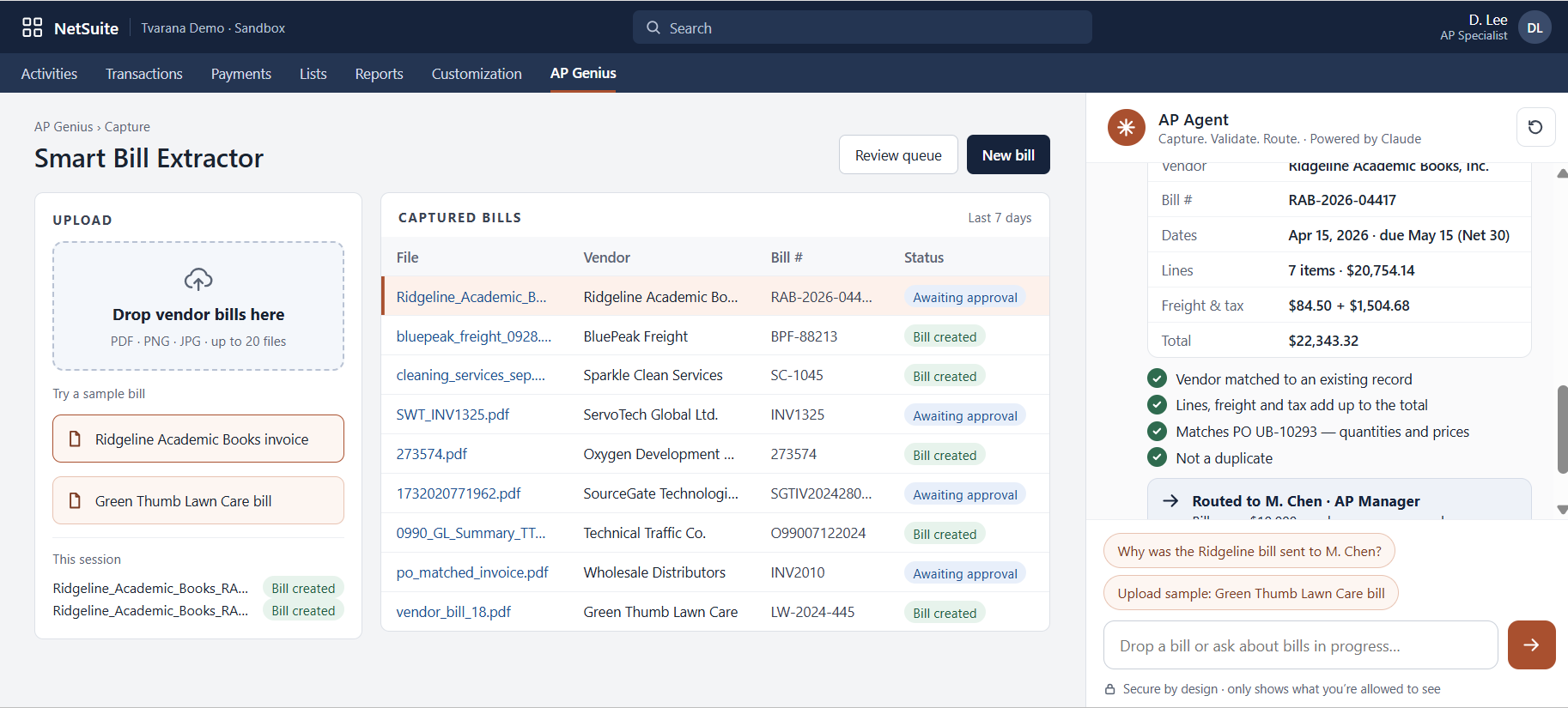
  • Capture. Upload a PDF or photo, or let it arrive by email or portal. The agent reads the vendor, every line and the totals, then creates the bill in NetSuite.

  • Validate. Vendor, math, purchase order and duplicate checks run first. Anything that doesn’t add up is held for review, not posted.

  • Route. Every bill goes to the right approver through your existing NetSuite approvals. Ask what’s waiting, or why a bill went to someone, and get a plain answer.

Ask it in plain English

  • “Which bills are waiting for approval?”
  • “Why was this invoice held?”
  • “Who approved the last bill from this vendor?”
  • “Show me bills that don’t match their PO.”

6 Key Features of AP AGENT

AI invoice capture

Reads the vendor, line items, totals, tax and currency from any layout, in any language.
PO matching

Matches every bill to its purchase order and receipt, and shows exactly where they differ.
Duplicate detection

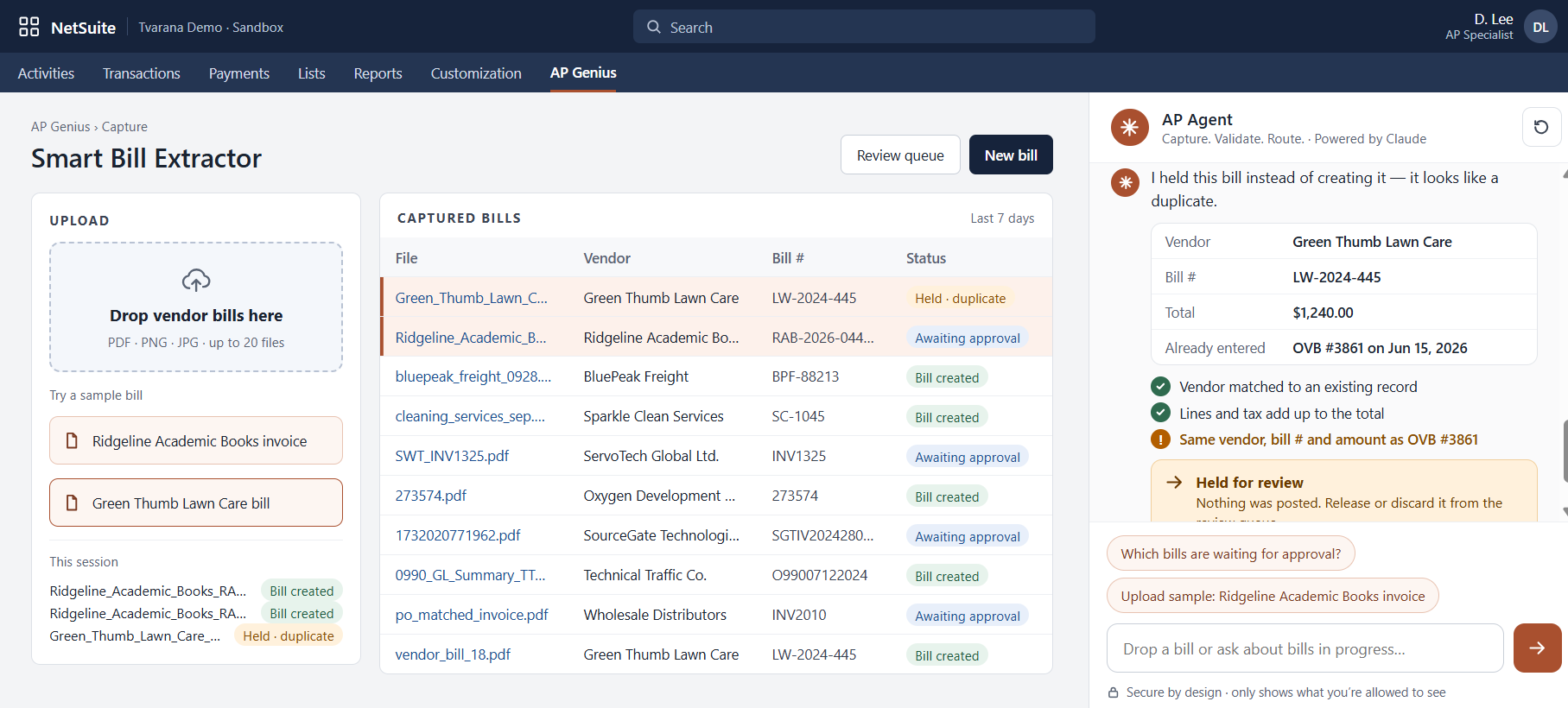
Catches invoices that were already entered and holds them before they post.

Split-screen review.

Compare the NetSuite bill against the original invoice side by side before you approve.

Vendor self-service

Vendors submit invoices and check status without a NetSuite license.

Approval routing

Bills follow your existing NetSuite approval rules, and every step is on record.
Without vs With the AP Agent

Feature Without the Agent With the AP Agent
Bill entry Keyed in line by line Captured from the invoice
PO matching Checked by hand Matched automatically, differences shown
Duplicates Found after payment Held before posting
Approval status Chased by email Asked in plain English
Vendor questions Answered by AP Answered in the vendor portal

See AP Agent at work

oracle netsuite
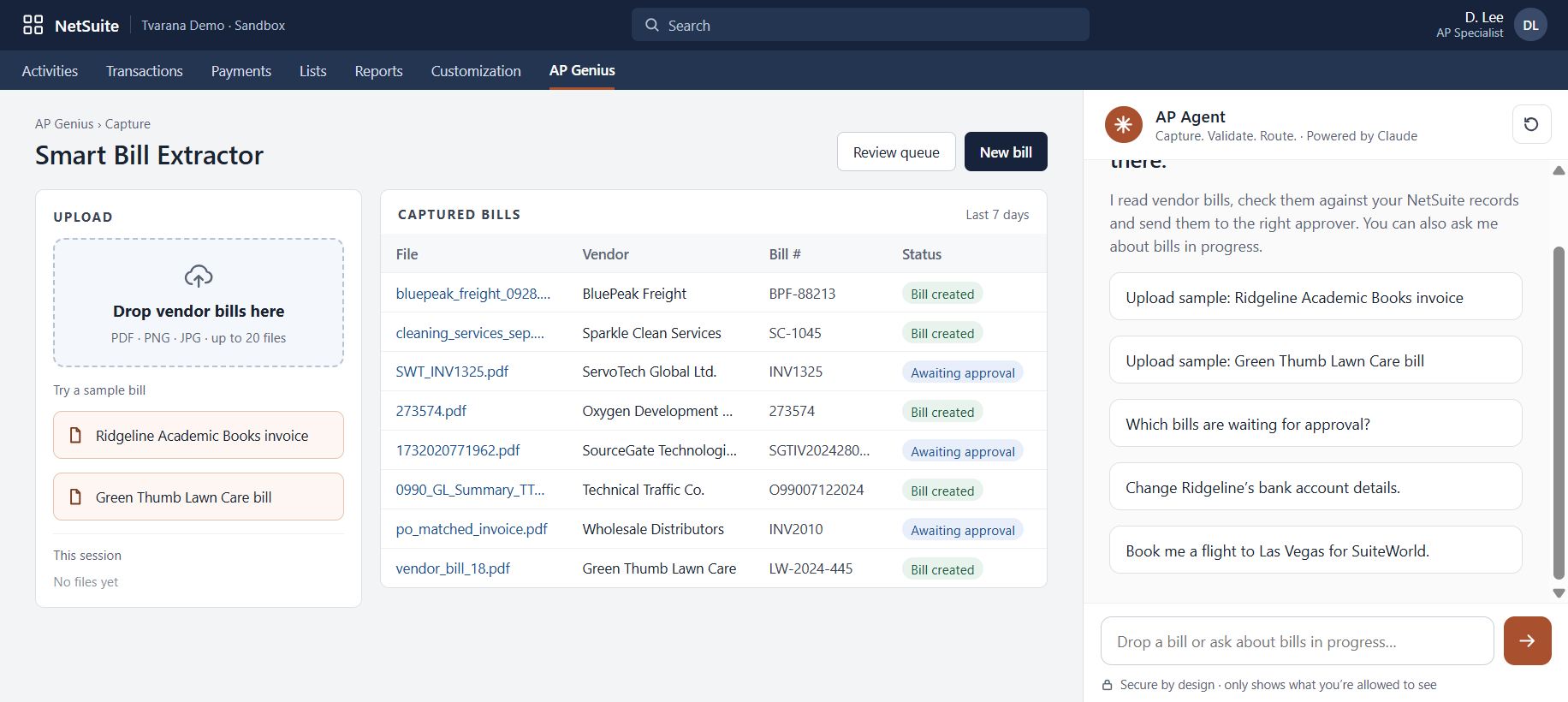
Drop a bill, get a bill. Upload a PDF or photo. The agent reads the vendor, every line and the totals, then creates the bill in NetSuite.
oracle netsuite
Knows its limits. The agent won’t change vendor bank details. Those stay with your people.
oracle netsuite
Stops bad bills before they post. This bill was already entered in June, so the agent held it for review.

Native to NetSuite. Not Bolted on.

  • Inside NetSuite. The agent works on your NetSuite records, so your team stays where it already works.
  • Your workflows. Results land as standard NetSuite records and go through your existing approvals.
  • Human in the loop. The agent finds, matches and recommends. Your people review and approve.
  • Within your permissions. Every agent only shows what the user is already allowed to see.

Case Studies

Client Success
That Speaks Volumes

Explore Case Studies
arrow leftarrow right red
slider arrow
600+ Monthly Invoices

Automated Invoice Processing

‍

3-Way Matching

Automated Matching Workflows

‍

0 Manual Coding

No Templates Required

‍

Case Studies

Client Success
That Speaks Volumes

Explore Case Studies
arrow leftarrow right red

Oops!

It seems we don’t have any content matching your selection right now. Try a different filter or check back soon for updates!
No items found.

FAQs

Does the AP Agent post bills on its own?

No. It captures and checks each bill, then sends it through your existing NetSuite approvals. A person approves before anything is paid.

Do we need invoice templates?

No. The agent reads any invoice layout, in any language and currency, with no templates or training.

How much data access does AI / LLM have?

The AI / LLM only has access to the specific documents and data provided to it for processing, such as the invoice being read. It does not have access to your broader NetSuite account, records, transactions, reports, financial data, customer data, vendor master data, or any other NetSuite information.

Do vendors need a NetSuite login?

No. Vendors send invoices by email or upload them to a self-service portal.

How is AP Agent different from NetSuite Bill Capture?

The AP Agent adds line-level capture, PO matching, duplicate checks and plain-English answers on top of standard NetSuite AP.

How long does it take for AP Agent to go live?

Most teams are live in days, not months. Our team handles setup inside your NetSuite account.

Your AP team has better things to do than type. Hand the invoices to the AP Agent.
Fill out the form to get started
Get Started